

Last updated: August 29, 2026
Mozilla's Pocket officially shut down on July 8, 2025. The app that millions of people relied on to save articles, recipes, and reading lists simply stopped working. And if you were one of them — whether you exported your data in time or you're only realizing it now — the question is the same: what do you do with your saved links going forward?
This guide gives you a clear, step-by-step plan: understand what happened, assess what you may have lost, and find a modern alternative that won't pull the rug out from under you.
What this post covers: Pocket's exact shutdown timeline, what happened to your data, how to decide what kind of tool you actually need, and what to do next.
Table of Contents
Pocket's Shutdown: The Full Timeline
It didn't happen overnight. Mozilla gave users several months of notice, but many users missed the announcements — and ended up losing access to years' worth of saved content.
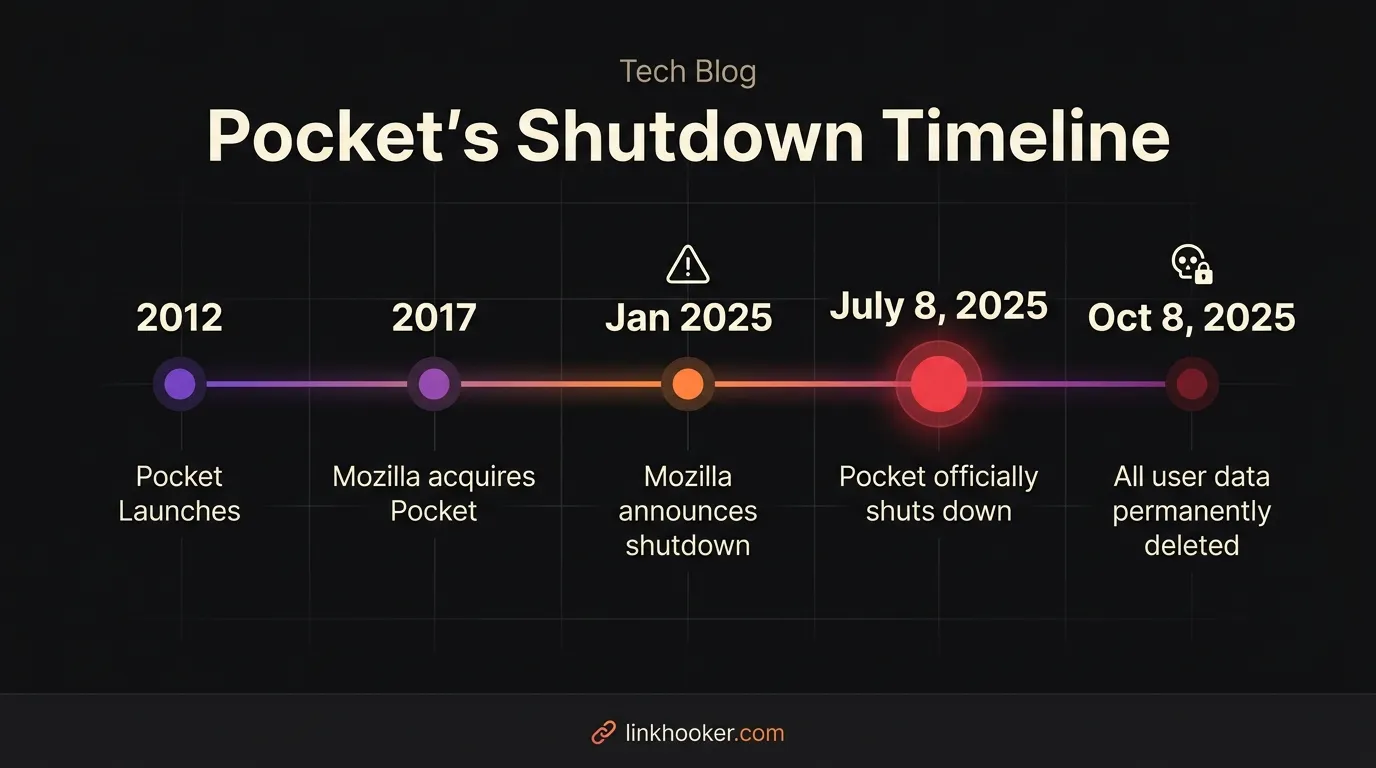 Pocket's full lifecycle: from a beloved read-it-later app to its official shutdown on July 8, 2025.
Here's the complete breakdown:
- 2012 — Pocket (originally "Read It Later") launches as a standalone app after years as a browser plugin.
- 2017 — Mozilla acquires Pocket and integrates it into Firefox.
- January 2025 — Mozilla officially announces Pocket will be discontinued, with a planned shutdown later in the year.
- July 8, 2025 — Pocket officially shuts down. The app, browser extensions, and website stop working. No new saves. No access to existing saves.
- October 8, 2025 — The export window closes. All Pocket accounts and saved data are permanently and irreversibly deleted.
If you are reading this after October 8, 2025, your Pocket data is gone and cannot be recovered from Mozilla's side.
What Happened to Your Saved Links?
There are three possible scenarios depending on when you last used Pocket:
Scenario A: You exported before July 8, 2025 You're in the best position. Mozilla offered a data export as an HTML file containing all your saved URLs, titles, and tags. You have your data and just need to import it somewhere new.
Scenario B: You discovered the shutdown between July 8 and October 8, 2025
Mozilla kept the export tool available during this grace period. If you acted during this window, you were able to download your links as an HTML file. Check your downloads folder or email for a file called ril_export.html.
Scenario C: You're finding out after October 8, 2025 Unfortunately, the data is gone on Mozilla's end. Your links cannot be recovered from Pocket itself. However, some data might be partially recoverable through:
- Browser history — if you clicked links from Pocket into your browser, they may still be in your history.
- Wayback Machine — if you remember specific URLs,
web.archive.orgmay have snapshots. - Email history — Pocket's weekly digests sent link titles via email; searching your inbox for "Pocket" may surface some titles.
Step 1: Check If You Can Still Export
If you still have access to your Pocket export file, here's what to do with it:
- Locate your
ril_export.htmlfile. Search your downloads folder and email for "Pocket export" or "ril_export". - Open it in a browser to verify it loads and contains your saved links.
- Do not delete it — this is the only copy of your data now that Pocket servers are offline.
- Import it into your new tool. Most link managers accept standard HTML bookmark files. Check your chosen app's settings for an "Import" option.
Note on Link Hooker import: If you're moving to Link Hooker, visit the features page for current information on supported import formats and migration tools.
What Kind of Link Saver Do You Actually Need?
Before picking the first app you find, it's worth spending two minutes to figure out what you actually need. Most users discover they were using Pocket for something beyond simple article reading — and that their next tool should reflect that.
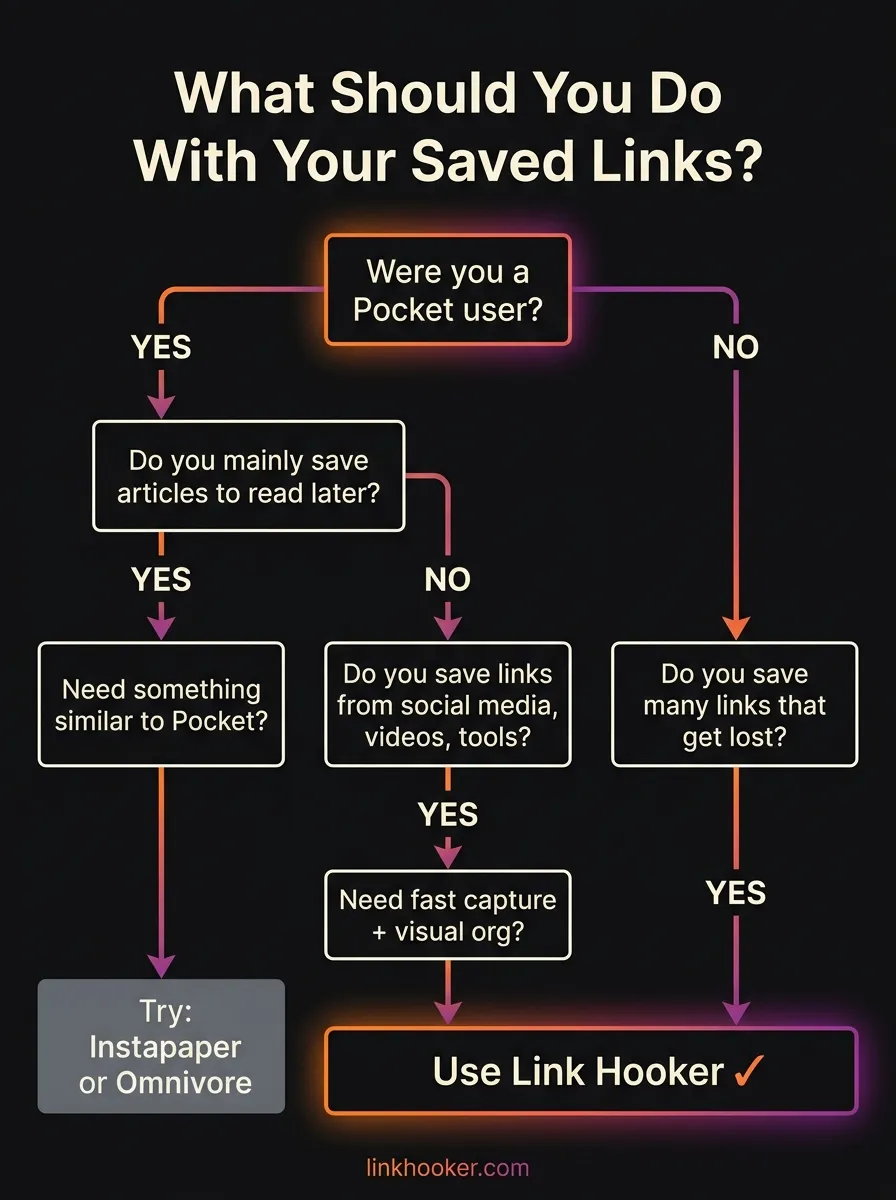 Use this decision tree to find the right type of tool for your specific workflow.
Here's a quick summary of the decision:
- If you primarily saved long-form articles to read offline → A pure read-it-later app (like Instapaper) may be the best fit.
- If you saved a mix of links — YouTube videos, tools, social posts, GitHub repos, articles — → You need a link organizer, not a reading app. This is where most Pocket users actually land.
- If you were frustrated that Pocket's search was unreliable or locked behind Premium → You need a tool where search is a first-class citizen, not an add-on.
The vast majority of displaced Pocket users fall into the second or third category. If you want a detailed side-by-side comparison of the top options available right now, read our full breakdown: Best Pocket Alternatives in 2026: The Complete Migration Guide. For a wider view beyond Pocket specifically, see Best Bookmark Manager Apps in 2026, Compared.
How to Move Forward With Link Hooker
Link Hooker was built for exactly the kind of user Pocket underserved: someone who saves everything — not just articles — and needs to actually find those links again later.
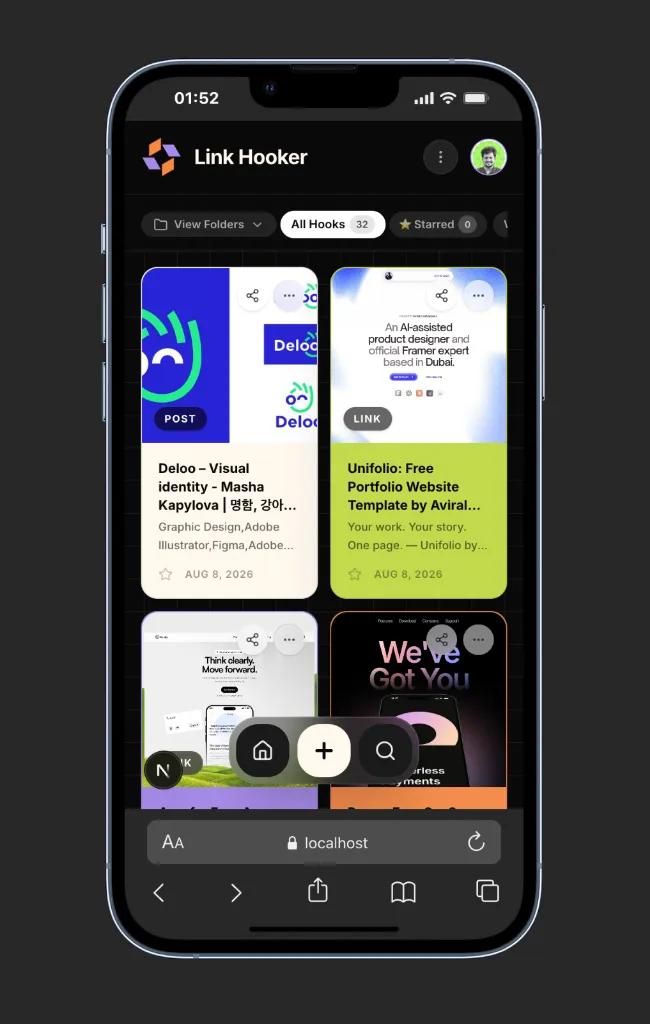 Link Hooker organizes all your saved links with rich visual previews, personal notes, and fast search — on both mobile and desktop.
Here's what makes it the right next step after Pocket:
1. Save Anything, Not Just Articles
Link Hooker doesn't try to parse your link into a clean reading view. It saves the URL and automatically pulls the rich preview (title, description, and OG image), so YouTube videos, Figma files, SaaS tools, and social posts all look great and are easy to recognize at a glance. This is especially useful if you've been relying on informal workarounds like WhatsApp self-chat to save links — a habit that leads to losing far more than you realize.
2. Search That Actually Works
One of the biggest complaints about Pocket was that full-text search was locked behind a Premium subscription — and even then, it only searched article text, not your own notes. Link Hooker's search indexes both the page metadata and your personal notes, so you can search for why you saved something, not just what it was.
3. Folders That Actually Work
Pocket's tagging system was powerful in theory, but most users ended up with dozens of vague tags they never used. Link Hooker uses a clean Folder system with a special "Uncategorized" catch-all so nothing gets lost — even links you save in a rush.
4. Built to Last
A key concern after losing Pocket is: will this app disappear too? Link Hooker is an independently built product with a sustainable pricing model — not a free tool propped up by a tech giant's goodwill.
You can explore the complete feature set on the features page or review the pricing options to find the plan that fits your use case.
| What You Need | Pocket (Shut Down) | Link Hooker | Instapaper |
|---|---|---|---|
| Save articles to read later | ✓ (offline) | ✓ (with preview) | ✓ (offline) |
| Save videos, tools & social links | Poor | Excellent | Poor |
| Free full-text search | Premium only | Yes (Free & Pro) | Premium only |
| Personal notes on each link | No | Yes (at capture) | Highlights only |
| Still active & maintained | ✗ (shut down) | ✓ | ✓ |
Frequently Asked Questions
When exactly did Pocket shut down? ▼
Can I recover my Pocket saved links after the shutdown? ▼
What is the best replacement for Pocket in 2025 and 2026? ▼
Why did Mozilla shut down Pocket? ▼
Can I import my Pocket export file into Link Hooker? ▼


Harshal Saraf
Founder, Link Hooker
Harshal built Link Hooker after realizing traditional read-it-later apps couldn't keep up with the modern internet. Pocket's shutdown was a wake-up call for millions of users: the tools we rely on can disappear. Link Hooker is built to be the last link organizer you'll ever need. Hook it before you lose it.